wget -q "https://ftp.mozilla.org/pub/mozilla.org/firefox/nightly/latest-mozilla-aurora/?C=M;O=A" -O - | awk '/en-US.linux-i686.tar.bz2">/ {gsub(/href="/,"",$6)+gsub(/">.*/,"",$6); print "https://ftp.mozilla.org/pub/mozilla.org/firefox/nightly/latest-mozilla-aurora/"$6}' | while read a
do
 wget -c "$a" -q -O /tmp/firefox-aurora-en-US.linux-i686.tar.bz2 && cd mydir  && tar -xvjf /tmp/firefox-aurora-en-US.linux-i686.tar.bz2
done
Saturday, June 23, 2012
script to download latest firefox aurora
script to download latest firefox aurora and extract to mydir


script to download latest firefox nightly build
script to download latest firefox nightly build and extract to mydir
wget http://nightly.mozilla.org/ -q -O - |awk '/en-US.linux-i686/ {gsub(/href="/,"",$2)+gsub(/">/,"",$2);print $2}' | while read a
do
   wget -c "$a" -q -O /tmp/firefox-nightly-en-US.linux-i686.tar.bz2  && cd mydir && tar -xvjf /tmp/firefox-nightly-en-US.linux-i686.tar.bz2
done
Thursday, May 24, 2012
xbmc as myth frontend on macosx
xbmc these days can function as mythtv frontend. I found xbmc easier to setup on other OS'es other than my regular front and back ends.
For instance, my regular mythtv back and front ends are Ubuntu lucid LTS (10.04); but I also have a macbook pro (running mac osx), and a Lenovo U400 running Ubuntu precise.
Here's how I setup xbmc as my mythtv frontenv.
Assumptions:
My myth backend is 192.168.1.100
Step 1.
Install xbmc. Refer http://xbmc.org/download/ on howto, for your platform.
Step 2.
Install MythBox addon. Go to Videos -> Add-ons -> Get More.. and select and install MythBox.
Step 3.
Go into MythBox to where you can define the MySQL details. Here's how I've configured mine:
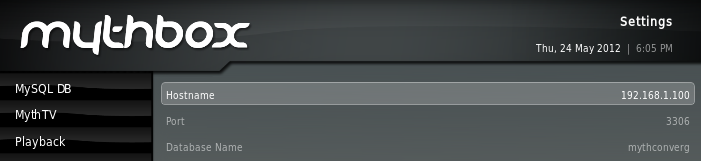
Step 4.
Spawn xbmc. Before we do that, lets route 6543 traffic to the myth backend server.
(Note: you can use socat easier than ssh, there is an example elsewhere in this blog to use socat)
mac
linux
Start MythBox, enjoy
For instance, my regular mythtv back and front ends are Ubuntu lucid LTS (10.04); but I also have a macbook pro (running mac osx), and a Lenovo U400 running Ubuntu precise.
Here's how I setup xbmc as my mythtv frontenv.
Assumptions:
My myth backend is 192.168.1.100
Step 1.
Install xbmc. Refer http://xbmc.org/download/ on howto, for your platform.
Step 2.
Install MythBox addon. Go to Videos -> Add-ons -> Get More.. and select and install MythBox.
Step 3.
Go into MythBox to where you can define the MySQL details. Here's how I've configured mine:
Step 4.
Spawn xbmc. Before we do that, lets route 6543 traffic to the myth backend server.
(Note: you can use socat easier than ssh, there is an example elsewhere in this blog to use socat)
mac
$ /usr/X11/bin/xterm -title "Close_me_after_myth" -e "ssh -c blowfish -L 6543:localhost:6543 192.168.1.100 cat - "
linux
$ /usr/bin/xterm -title "Close_me_after_myth" -e "ssh -c blowfish -L 6543:localhost:6543 192.168.1.100 cat - " &
Start MythBox, enjoy
Tuesday, November 22, 2011
the thin myth-tv frontend
Running a thin myth-tv frontend:
-------------------------------

Here's how to setup a thin frontend for mythtv with minimal config and filesets.

Install mythtv frontend and socat on your machine.


# apt-get install mythtv-frontend socat


Create a file called ~/bin/thin-myth.sh:
(in my case, the IP of my backend server is 192.168.1.100)


#! /bin/bash
log="~/myth-tv.log"

#set the IP of your backend server.
IP=192.168.1.100

xrandr >> $log
socat -b 128000 -d -d -lmlocal2 TCP4-LISTEN:3306,fork,reuseaddr  TCP4:$IP:3306 &
socat -b 128000 -d -d -lmlocal2 TCP4-LISTEN:6543,fork,reuseaddr  TCP4:$IP:6543  &
/usr/bin/mythfrontend -l $log


Ensure that DBHostname in ~/.mythtv/config.xml and ~/.mythtv/mysql.txt is set to 127.0.0.1:

$ grep 127.0.0.1 config.xml mysql.txt
config.xml:        127.0.0.1
mysql.txt:DBHostName=127.0.0.1


Launch ~/bin/thin-myth.sh and enjoy.

How does it work?
-----------------
socat listens on 3306,6543 for mysql and mythbackend ports respectively and relays those onto your
mysql and mythbackend ports on your backend server.
more here..
Monday, February 07, 2011
Wifi recommendation for HD streaming
I stream HD media over wifi, lots and lots of it. I live in a rented apartment where there're no wired ports available. I tried Belkin Ethernet over power adapter to carry my HD traffic, it failed miserably. Then I tried to bridge my wireless G usb dongle along with my wired nic - it never worked.
Then I went onto buy a "NETGEAR WNDR3400-100NAS IEEE 802.11a/b/g/n 2.4/5GHz Simultaneous Dual Band N600 Wireless Router" and a "NETGEAR WNCE2001 Wireless 802.11b/g/n Ethernet Port Universal WiFi Internet Adapter" as my bridge.
Sadly the bridge is in 2.4Ghz spectrum, and is susceptible to interference, even to microwaves. (2.4Ghz is such a crowded space - microwaves, garage door openers, cordless phones all use it - compared to that, 5.x GHz spectrum is squeaky clean..!)
I returned the 2.4Ghz WNCE2001 bridge and got a "Cisco-Linksys WET610N Dual-Band Wireless-N Gaming and Video Adapter" from Amazon - as implied, this bridge can talk in the 5.x Ghz spectrum. It has been almost a month now, and my HD streaming is working smooth.
Gist: For HD streaming over wifi - go for Wireless N devices in the 5.x Ghz spectrum, you will be happy!
keywords: mythtv wifi recommendation, hd streaming over wifi
Then I went onto buy a "NETGEAR WNDR3400-100NAS IEEE 802.11a/b/g/n 2.4/5GHz Simultaneous Dual Band N600 Wireless Router" and a "NETGEAR WNCE2001 Wireless 802.11b/g/n Ethernet Port Universal WiFi Internet Adapter" as my bridge.
Sadly the bridge is in 2.4Ghz spectrum, and is susceptible to interference, even to microwaves. (2.4Ghz is such a crowded space - microwaves, garage door openers, cordless phones all use it - compared to that, 5.x GHz spectrum is squeaky clean..!)
I returned the 2.4Ghz WNCE2001 bridge and got a "Cisco-Linksys WET610N Dual-Band Wireless-N Gaming and Video Adapter" from Amazon - as implied, this bridge can talk in the 5.x Ghz spectrum. It has been almost a month now, and my HD streaming is working smooth.
Gist: For HD streaming over wifi - go for Wireless N devices in the 5.x Ghz spectrum, you will be happy!
keywords: mythtv wifi recommendation, hd streaming over wifi
Monday, January 24, 2011
rsync delta-transfer algorithm
rsync delta-transfer algorithm is pretty cool, reduces the amount of data sent over the network by sending only the differences between the source files and the existing files in the destination.
append some data to somefile:
rsync just sends out the delta(!), 2452494012 bytes the very first time vs. 266589 to accomodate delta.
export alias scpr='rsync -av --partial --progress --rsh="ssh -c arcfour -o compression=no -o StrictHostKeyChecking=no"'

myhost:/tmp# ls -ltrh somefile
-rw-r----- 1 root root 2.3G Jan 24 11:53 somefile

myhost:/tmp# time scpr somefile somehost:/tmp/
somefile
  2452194584 100%   67.76MB/s    0:00:34 (xfer#1, to-check=0/1)

sent 2452494012 bytes  received 31 bytes  65399841.15 bytes/sec
total size is 2452194584  speedup is 1.00

real    0m37.408s
user    0m22.341s
sys     0m5.624s
append some data to somefile:
myhost:/tmp# dmesg >> somefile


myhost:/tmp# time scpr somefile somehost:/tmp/

somefile
  2452249209 100%  137.71MB/s    0:00:16 (xfer#1, to-check=0/1)

sent 266589 bytes  received 396255 bytes  20395.20 bytes/sec
total size is 2452249209  speedup is 3699.59

real    0m32.525s
user    0m16.521s
sys     0m0.484s
myhost:/tmp#
rsync just sends out the delta(!), 2452494012 bytes the very first time vs. 266589 to accomodate delta.
scp: transfer speed & compression
With compression:
Without compression:
details of somefile:
Gist: if a file is already compressed, scp-ing with -C (compression) rightly slows down the transfer.
$ time scp -c arcfour -C somefile somehost:/somewhere

real    47m30.974s
user    46m18.974s
sys     1m4.040s
Without compression:
$ time scp -c arcfour  somefile somehost:/somewhere
real    10m41.195s
user    2m41.142s
sys     0m51.611s
details of somefile:
$ file somefile
somefile: MySQL MISAM compressed data file Version 1
Gist: if a file is already compressed, scp-ing with -C (compression) rightly slows down the transfer.
Friday, December 31, 2010
suggestion to shareholic/boxee
I use shareholic to add items to boxee, and have a suggestion to make:
currently shareholic cannot find boxee-able itmes in pages like http://www.asianetglobal.com/ShowVdo.aspx?GlHID=2008, but can be easily fixed.
if you look closely, from,
you should be able to extract just the flv url fairly easily,
I'd love to see this added to shareholic
currently shareholic cannot find boxee-able itmes in pages like http://www.asianetglobal.com/ShowVdo.aspx?GlHID=2008, but can be easily fixed.
if you look closely, from,
http://www.asianetglobal.com/flvplayer.swf?videoURL=http://videos.asianetglobal.com/flv/asianet/VdoGallery/KKandathum2712.flv&thumbURL=Images/VdoGallery/Kettathum%20Kandathum.jpg
you should be able to extract just the flv url fairly easily,
http://videos.asianetglobal.com/flv/asianet/VdoGallery/KKandathum2712.flv
I'd love to see this added to shareholic
Saturday, December 11, 2010
Microsoft LifeCam Cinema

So far this has been the best webcam I've ever used. It's an HD webcam, 720p HD widescreen, even works on ubuntu (lucid) linux right away under uvcvideo. It also has a microphone, and the audio quality is very clear.
[ 26.861845] uvcvideo: Found UVC 1.00 device Microsoft® LifeCam Cinema(TM) (045e:075d)
[ 26.911241] input: Microsoft® LifeCam Cinema(TM) as /devices/pci0000:00/0000:00:0b.1/usb1/1-3/1-3:1.0/input/input6
$ lsusb |grep -i microsoft
Bus 001 Device 003: ID 045e:075d Microsoft Corp.
Above all, it is priced reasonably.
vital specs:
- 720p HD Widescreen Video
- Auto Focus
- High-precision glass element lens
- ClearFrame Technology for smooth, detailed video
- Digital, noise-canceling microphone
tl;dr: here's a good HD webcam for almost all operating systems. works with skype and other IMs.
Tuesday, November 23, 2010
nokia sale shrinks in india - here's why


in case you didnt know it already nokia, we indians like products which are durable. stop stealing from us, stop dumping flaky stuff on indian markets.
Saturday, October 09, 2010
Microsoft Corp. LifeCam VX-7000
Microsoft Corp. LifeCam VX-7000 is an "OK" usb camera. here's the amazon.com page with more details


Technical Details
Model: CEA-00001
Audio Input: Built-in microphone
Video Capture Resolution: 1600 x 1200
Image types: JPEG
Image Capture Speed: 30 fps

here's the lsusb o/p against this webcam:

Bus 001 Device 003: ID 045e:0723 Microsoft Corp. LifeCam VX-7000 (UVC-compliant)

It also works on linux. I used Lifecam VX-7000 to make video calls on skype on linux. I start skype as shown below, and it works great:

$ cat /usr/bin/start-skype.sh
#! /bin/bash

bash -c 'LD_PRELOAD=/usr/lib/libv4l/v4l1compat.so skype'

So in short, if you're looking to buy a good cam which would work in linux, go for VX-7000.

Sunday, September 26, 2010
hdhomerun single doing multirec
hdhomerun single doing mulirec (record multiple channels on the same DVB multiplex) on my lucid. (http://bit.ly/9hcBeo)

to setup this feature, do the following: (ref)
1. Exit the myth frontend.
2. Stop the myth backend (ALT-2)
3. Start mythtv-setup (ALT-s)
4. Select "2 Capture cards"
5. Select your capture card. Remember, it must be a digital tuner.
6. Hit the "Recording Options" button.
7. Increase "Max Recordings" from 1 to the number you want to allow.
8. Exit mythtv setup
9. Restart mythth backend (ALT-3)
10. Restart the front end (ALT-m)
to setup this feature, do the following: (ref)
1. Exit the myth frontend.
2. Stop the myth backend (ALT-2)
3. Start mythtv-setup (ALT-s)
4. Select "2 Capture cards"
5. Select your capture card. Remember, it must be a digital tuner.
6. Hit the "Recording Options" button.
7. Increase "Max Recordings" from 1 to the number you want to allow.
8. Exit mythtv setup
9. Restart mythth backend (ALT-3)
10. Restart the front end (ALT-m)
Tuesday, September 07, 2010
Belkin 1000Mbps Gigabit Powerline HD Starter Kit review
So today i brought from Frys "Belkin 1000Mbps Gigabit Powerline HD Starter Kit for High Definition Video Streaming" - hoping that I get to watch HD mythtv recordings on my mythfrontend without the annoying pauses.
Needless to say, it gave me pain already, it would freeze up on me. I had to unplug the receiving end a couple of times to get past the hiccup.
Before returning it, I chose to attempt a f/w update against the latest and greatest from their web-page. I found this detailed instructions. When I run the thingy downloaded from the website, it seems like it downgraded my f/w version.
Before the "upgrade":

After the upgrade:

as you can see, i got downgraded to 2.0.9 from 2.2.0 although the svn branch got hiked to 25645 from 25122 -- looks like Belkin does not have much of a grip on cohesive version control.
Either way, for my own selfish sake, i hope this fixes the random hiccups i've been experiencing on these device.
Saturday, July 10, 2010
Enabling display acceleratiun on Lenovo ThinkPad T500 2242-CTO
So I got a Lenovo ThinkPad T500 2242-CTO running 64bit lucid. Boxee, and Hulu refused to run on it citing lack of acceleration/ direct rendering.
T500 2242-CTOs come with Integrated Intel GMA 4500MHD, also known as "Intel Mobile 4 Series" (http://bit.ly/9lU6Wp)
Odd thing was despite having an Intel display adapter, the libGL.so.1 was linked to some nvidia nuisance (highlighted below)
$ ldd `which glxinfo`
linux-vdso.so.1 => (0x00007fff27fff000)
libGL.so.1 => /usr/lib/nvidia-current/libGL.so.1 (0x00007f6f64bb0000)
libm.so.6 => /lib/libm.so.6 (0x00007f6f6492d000)
libX11.so.6 => /usr/lib/libX11.so.6 (0x00007f6f645f6000)
libpthread.so.0 => /lib/libpthread.so.0 (0x00007f6f643d9000)
libc.so.6 => /lib/libc.so.6 (0x00007f6f64056000)
libXext.so.6 => /usr/lib/libXext.so.6 (0x00007f6f63e43000)
libXxf86vm.so.1 => /usr/lib/libXxf86vm.so.1 (0x00007f6f63c3d000)
libXdamage.so.1 => /usr/lib/libXdamage.so.1 (0x00007f6f63a3a000)
libXfixes.so.3 => /usr/lib/libXfixes.so.3 (0x00007f6f63833000)
libdrm.so.2 => /lib/libdrm.so.2 (0x00007f6f63628000)
libdl.so.2 => /lib/libdl.so.2 (0x00007f6f63424000)
libxcb.so.1 => /usr/lib/libxcb.so.1 (0x00007f6f63207000)
/lib64/ld-linux-x86-64.so.2 (0x00007f6f64e54000)
librt.so.1 => /lib/librt.so.1 (0x00007f6f62fff000)
libXau.so.6 => /usr/lib/libXau.so.6 (0x00007f6f62dfa000)
libXdmcp.so.6 => /usr/lib/libXdmcp.so.6 (0x00007f6f62bf4000)
That does not belong there, and here's how I fixed it:
# mv /usr/lib/nvidia-current/libGL.so.1 /usr/lib/nvidia-current/libGL.so.1.junk
# ln -s /usr/lib/libGL.so /usr/lib/nvidia-current/libGL.so.1
After a reboot, direct rendering is enabled:
$ LIBGL_DEBUG=verbose glxinfo | grep "direct rendering"
direct rendering: Yes
Also Ref:
[ubuntu] client glx version string: SGI with NVIDIA drivers?!? - Ubuntu Forums
T500 2242-CTOs come with Integrated Intel GMA 4500MHD, also known as "Intel Mobile 4 Series" (http://bit.ly/9lU6Wp)
Odd thing was despite having an Intel display adapter, the libGL.so.1 was linked to some nvidia nuisance (highlighted below)
$ ldd `which glxinfo`
linux-vdso.so.1 => (0x00007fff27fff000)
libGL.so.1 => /usr/lib/nvidia-current/libGL.so.1 (0x00007f6f64bb0000)
libm.so.6 => /lib/libm.so.6 (0x00007f6f6492d000)
libX11.so.6 => /usr/lib/libX11.so.6 (0x00007f6f645f6000)
libpthread.so.0 => /lib/libpthread.so.0 (0x00007f6f643d9000)
libc.so.6 => /lib/libc.so.6 (0x00007f6f64056000)
libXext.so.6 => /usr/lib/libXext.so.6 (0x00007f6f63e43000)
libXxf86vm.so.1 => /usr/lib/libXxf86vm.so.1 (0x00007f6f63c3d000)
libXdamage.so.1 => /usr/lib/libXdamage.so.1 (0x00007f6f63a3a000)
libXfixes.so.3 => /usr/lib/libXfixes.so.3 (0x00007f6f63833000)
libdrm.so.2 => /lib/libdrm.so.2 (0x00007f6f63628000)
libdl.so.2 => /lib/libdl.so.2 (0x00007f6f63424000)
libxcb.so.1 => /usr/lib/libxcb.so.1 (0x00007f6f63207000)
/lib64/ld-linux-x86-64.so.2 (0x00007f6f64e54000)
librt.so.1 => /lib/librt.so.1 (0x00007f6f62fff000)
libXau.so.6 => /usr/lib/libXau.so.6 (0x00007f6f62dfa000)
libXdmcp.so.6 => /usr/lib/libXdmcp.so.6 (0x00007f6f62bf4000)
That does not belong there, and here's how I fixed it:
# mv /usr/lib/nvidia-current/libGL.so.1 /usr/lib/nvidia-current/libGL.so.1.junk
# ln -s /usr/lib/libGL.so /usr/lib/nvidia-current/libGL.so.1
After a reboot, direct rendering is enabled:
$ LIBGL_DEBUG=verbose glxinfo | grep "direct rendering"
direct rendering: Yes
Also Ref:
[ubuntu] client glx version string: SGI with NVIDIA drivers?!? - Ubuntu Forums
Thursday, May 14, 2009
Subscribe to:
Posts (Atom)


This work is licensed under a Creative Commons License.
