A few things, mostly technical notes...

Showing posts with label xbmc. Show all posts

Saturday, March 09, 2013

install xbmc frodo on ubuntu 10.04 (Lucid)

xbmc does not seem to provide PPAs for Ubuntu Lucid at the moment. Like many others, I am not upgrading from Lucid LTS for another 2 years until its LTS span runs out, if I can help it.

Here's how to install xbmc 12.0 (aka Frodo) on Ubuntu Lucid:


sudo add-apt-repository ppa:nathan-renniewaldock/xbmc-nightly 
sudo apt-get update 
sudo apt-get install xbmc 
sudo apt-get install libtag1-dev 


Enjoy!

(reference)


Thursday, May 24, 2012

xbmc as myth frontend on macosx

xbmc these days can function as mythtv frontend. I found xbmc easier to setup on other OS'es other than my regular front and back ends.

For instance, my regular mythtv back and front ends are Ubuntu lucid LTS (10.04); but I also have a macbook pro (running mac osx), and a Lenovo U400 running Ubuntu precise.

Here's how I setup xbmc as my mythtv frontenv.

Assumptions:

My myth backend is 192.168.1.100

Step  1.

Install xbmc. Refer http://xbmc.org/download/ on howto, for your platform.

Step 2.

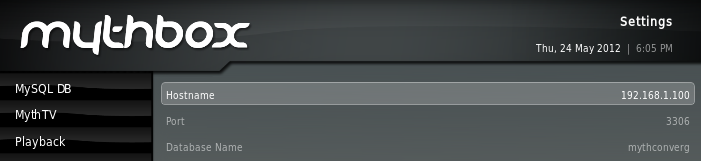
Install MythBox addon. Go to Videos -> Add-ons -> Get More.. and select and install MythBox.

Step 3.

Go into MythBox to where you can define the MySQL details.  Here's how I've configured mine:


Step 4.


Spawn xbmc. Before we do that, lets route 6543 traffic to the myth backend server.

(Note: you can use socat easier than ssh, there is an example elsewhere in this blog to use socat)

mac


$ /usr/X11/bin/xterm -title "Close_me_after_myth" -e "ssh -c blowfish -L 6543:localhost:6543 192.168.1.100 cat - " 


linux
 
$ /usr/bin/xterm  -title "Close_me_after_myth" -e "ssh -c blowfish -L 6543:localhost:6543 192.168.1.100 cat - " & 


Start MythBox, enjoy


Followers


Creative Commons License
This work is licensed under a Creative Commons License.