A few things, mostly technical notes...

Showing posts with label mythtv. Show all posts

Sunday, December 22, 2013

mythtv - Auto-delete duplicate recordings with myth-remove-duplicates.sh


Question:

I have a large archive of recordings on a well-used mythbox and I know I have accumulated a lot of duplicates. I need to free some space, but going through and manually getting rid of the duplicates would be a monumental task.

Is there any mechanism or script available to track down these duplicates, and preferably delete all but the newest recording? I've searched the web and poked at my interface with no luck.

Answer:

You're welcome to use the script I wrote; I've been running it regularly to remove the duplicates.

$ wget http://evuraan.info/evuraan/stuff/myth-remove-duplicates.sh.txt -O myth-remove-duplicates.sh
$ chmod +x myth-remove-duplicates.sh 

Edit to replace RECORDINGDIR, user_name and pass_word with what's applicable to your setup and run myth-remove-duplicates.sh.

Running it :

$ ./myth-remove-duplicates.sh
1091_20131221090100.mpg is duplicate
removed `/var/lib/mythtv/recordings/1091_20131221090100.mpg'
1091_20131221070100.mpg is duplicate
removed `/var/lib/mythtv/recordings/1091_20131221070100.mpg'

Here's the script, myth-remove-duplicates.sh:

#!/bin/bash 
# Authored by Evuraan_AT_gmail_DOT_com
# ABSOLUTELY NO WARRANTY, to the extent permitted by
# applicable law.
# YMMV.
# Use at your own risk.

user_name="mythtv"
pass_word="yourpassword" 
RECORDINGDIR="/var/lib/mythtv/recordings"
list="/tmp/recordings.txt-$RANDOM-$RANDOM"
SQLSCRIPT="/tmp/recordings.sql-txt-$RANDOM-$RANDOM"

gen_lists(){
mysql -u "$user_name" -p"$pass_word" -e "select starttime,basename,title,description from recorded order by starttime" mythconverg | tac > $list
}

verify_duplicate(){
# if verbatim repeats..
sum_a=$(egrep "${a:0:16}" $list | awk -F".mpg\t" 'NR>1 {print $NF}' |md5sum) 
[ ! -z "$sum_a" ] && egrep "${a:0:16}" $list | awk -F".mpg\t" 'END {print $NF}' | md5sum |egrep -q  ${sum_a//-}
}

remove_duplicates(){
[ -s "${RECORDINGDIR}/${a}" ] && ( rm -v "${RECORDINGDIR}/${a}" ; 
	echo "DELETE FROM mythconverg.recorded WHERE basename = '$a';" > $SQLSCRIPT
	)
[ -s $SQLSCRIPT ] && mysql -u "$user_name" -p"$pass_word"   mythconverg < $SQLSCRIPT
}


gen_lists
awk {'print $3'} $list  |grep mpg$ | while read a ; do 
	[[ $(egrep -c ${a:0:16} $list ) -ge 2 ]]  && verify_duplicate && sed -i /"${a:0:16}"/d $list && echo $a is duplicate && remove_duplicates
done

rm $SQLSCRIPT $list 1>/dev/null 2>&1 || : 

Thursday, May 24, 2012

xbmc as myth frontend on macosx

xbmc these days can function as mythtv frontend. I found xbmc easier to setup on other OS'es other than my regular front and back ends.

For instance, my regular mythtv back and front ends are Ubuntu lucid LTS (10.04); but I also have a macbook pro (running mac osx), and a Lenovo U400 running Ubuntu precise.

Here's how I setup xbmc as my mythtv frontenv.

Assumptions:

My myth backend is 192.168.1.100

Step  1.

Install xbmc. Refer http://xbmc.org/download/ on howto, for your platform.

Step 2.

Install MythBox addon. Go to Videos -> Add-ons -> Get More.. and select and install MythBox.

Step 3.

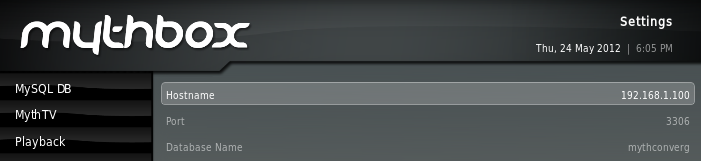
Go into MythBox to where you can define the MySQL details.  Here's how I've configured mine:


Step 4.


Spawn xbmc. Before we do that, lets route 6543 traffic to the myth backend server.

(Note: you can use socat easier than ssh, there is an example elsewhere in this blog to use socat)

mac


$ /usr/X11/bin/xterm -title "Close_me_after_myth" -e "ssh -c blowfish -L 6543:localhost:6543 192.168.1.100 cat - " 


linux
 
$ /usr/bin/xterm  -title "Close_me_after_myth" -e "ssh -c blowfish -L 6543:localhost:6543 192.168.1.100 cat - " & 


Start MythBox, enjoy


Tuesday, November 22, 2011

the thin myth-tv frontend

Running a thin myth-tv frontend:
-------------------------------

Here's how to setup a thin frontend for mythtv with minimal config and filesets.

Install mythtv frontend and socat on your machine.


# apt-get install mythtv-frontend socat


Create a file called ~/bin/thin-myth.sh:
(in my case, the IP of my backend server is 192.168.1.100)


#! /bin/bash
log="~/myth-tv.log"

#set the IP of your backend server.
IP=192.168.1.100 

xrandr >> $log
socat -b 128000 -d -d -lmlocal2 TCP4-LISTEN:3306,fork,reuseaddr  TCP4:$IP:3306 &
socat -b 128000 -d -d -lmlocal2 TCP4-LISTEN:6543,fork,reuseaddr  TCP4:$IP:6543  &
/usr/bin/mythfrontend -l $log


Ensure that DBHostname in ~/.mythtv/config.xml and ~/.mythtv/mysql.txt is set to 127.0.0.1:

$ grep 127.0.0.1 config.xml mysql.txt
config.xml:        127.0.0.1
mysql.txt:DBHostName=127.0.0.1


Launch ~/bin/thin-myth.sh and enjoy.

How does it work?
-----------------
socat listens on 3306,6543 for mysql and mythbackend ports respectively and relays those onto your 
mysql and mythbackend ports on your backend server. 
 
 
more here.. 

Sunday, September 26, 2010

hdhomerun single doing multirec

hdhomerun single doing mulirec (record multiple channels on the same DVB multiplex) on my lucid. (http://bit.ly/9hcBeo)

https://blogger.googleusercontent.com/img/b/R29vZ2xl/AVvXsEhrnIRHQ0KsyoyB5PwTMBICZI_ufkYiZG7D588RNvpz4rqKcmzX4BpLpZzbJ-tSB_o7ad-_Ct1Yw-heDs9BFcJ3iPGPNmH4UVX6ZspwX6Qq4GiI_L-Ad69phwXNXXPnUauR6hK0Tg/s1600/hdhr-mulirec.png


to setup this feature, do the following: (ref)

1. Exit the myth frontend.
2. Stop the myth backend (ALT-2)
3. Start mythtv-setup (ALT-s)
4. Select "2 Capture cards"
5. Select your capture card. Remember, it must be a digital tuner.
6. Hit the "Recording Options" button.
7. Increase "Max Recordings" from 1 to the number you want to allow.
8. Exit mythtv setup
9. Restart mythth backend (ALT-3)
10. Restart the front end (ALT-m)

Thursday, January 10, 2008

How to ensure Set-Top-Box (STB) is Powered On?

.

How to ensure Set-Top-Box (STB) is Powered On?


STB - in most cases, Set Top Boxes are the boxes the Cable/DishTV companies leave at your place with a remote control for you to flip channels. STBs are external, and in case of models like mine, there appeared to be no reliable method to ensure that it is powered on (Like in case of small power disruption. The computer would probably boot back up, but what about the dumb STB?. Read more about the uncertainity here in this thread. Or, here.)

I initially proposed something naive like this (alt link here) and went on to finalize this working script.

Requisites:
You will need ffmpeg and jp2a installed. On my Ubuntu 7.10, they were installed by running:

sudo apt-get install jp2a ffmpeg 


check_stb (link)

#! /bin/bash

# Authored by Evuraan_AT_gmail_DOT_com

# ABSOLUTELY NO WARRANTY, to the extent permitted by
# applicable law.

# YMMV.
# Use at your own risk.


pvr="/dev/video0"
t="$RANDOM-$RANDOM"
out="/tmp/$t.mpg"
mark="1727"
blank="0"
say="/usr/bin/logger -p info -t mythstb-check"
POWEROFF="0"
POWERON="0"
wakeup="/usr/local/bin/irsend SEND_ONCE blaster1 POWER"
info="/usr/local/bin/irsend SEND_ONCE blaster1 DISPLAY"


send_power_on() {
$say "`date` STB seems to be turned off, last count was $blank, attempting to Power it on" &
$wakeup 1>/dev/null 2>/dev/null || :
sleep 2
}

scan_images(){
for i in `echo /tmp/$t*.jpeg`
do
if [ -s "$i" ]
then
#blank="`jp2a $i --invert --size=72x24 | sed -e 's/./& \n/g'|grep -c "M"`"
blank="`jp2a $i --invert --size=72x24 | sed 's/W/M/g' | sed -e 's/./& \n/g'|grep -c "M"`"
 rm -f "$i" 1>/dev/null 2>/dev/null || :
else
 :
fi
[ "$blank" -gt "$mark" ] && export POWERON="100"
[ "$blank" -le "$mark" ] && export POWEROFF="100"
done
if [ "$POWERON" -eq "100" -a "$POWEROFF" -ne "100" ]
then
# its off
send_power_on
else
# power is on, non blank frames
$say "`date` STB seems to be turned on, last count was $blank"
:
fi

}

purge_stuff(){
[ -f "$out" ] && rm -f "$out" 1>/dev/null >/dev/null || :
}

#ivtv-tune -c 3 -d "$pvr" 1>/dev/null 2>/dev/null &

cd /tmp
$info &

dd if="$pvr" of="$out" bs=64K count=2  1>/dev/null 2>/dev/null

if [ -s "$out" ]
then
ffmpeg -i $out -f image2 -vcodec mjpeg /tmp/$t%d.jpeg 1>/dev/null 2>/dev/null
[ -s "/tmp/${t}1.jpeg" ] && scan_images
else
$say "`date` Unable to query $pvr, as it seems to be in use."
:
fi

purge_stuff &

The Idea:
The idea is pretty simple - read from your ivtv device using dd. ffmpeg then converts them into jpeg files (1 per frame). jp2a analyses each of those frames to check whether they're blank or not.


Implementation:
I placed this in my channel change script (example ), so mythtv ensures that the STB is powered on before changing channels. You can also cron it, but it is better to call this in the beginning of your channel change script, as that way, you have a higher chance of unhindered read access to $pvr.

This can be downloaded to your machine as:
wget http://evuraan.info/evuraan/check_stb.txt  -O /tmp/check_stb

To suite specific needs/situations, one may accordingly need to change the parameters pvr, mark and wakeup.

Feedbacks are welcome.

Monday, January 07, 2008

How to use ATI REMOTE Wonder II Remote for MythTv Frontend?

How to use ATI REMOTE Wonder II Remote for MythTv Frontend?


Inspired by their wiki-page, I ended up buying ATI REMOTE WONDER II Remote for my new MythTv Front End system. Here's how I setup
this remote control using xmodmap.


Here's how it works: (1) Launch myth front end with a custom keymap. (2) When we finish and exit myth frontend, reset the keymap to
the normal (sane keymap)


Step 0: Disable gnome-screensaver


I added the following to root's crontab to prevent auto screen lock whenever I pressed the lock button:

* * * * * /usr/bin/killall gnome-screensaver 1>/dev/null 2>/dev/null || :


Step 1: Create default/sane keymap


Fire up a terminal window (xterm/gnome-terminal) and run:

xmodmap -pke > /somedir/sanekeys.txt


Step 2: Create a launcher for myth front end


Let us call it /usr/bin/wmyth. Here would be its content.

#! /bin/bash

/usr/bin/xmodmap /somedir/map.txt | /usr/bin/mythfrontend 2>/dev/null
/usr/bin/xmodmap /somedir/sanekeys.txt


Step 3: Create /somedir/map.txt


Place the following as /somedir/map.txt:

! power
keycode 222 = F1
! scan
keycode 229 = F2
! mute
keycode 160 = F3
! recall
keycode 133 = F4
! stop
keycode 232 = F5
! play
keycode 179 = p
! <<
keycode 152 = Q
! >>
keycode 233 = U
! vol+
keycode 176 = F10
! vol-
keycode 174 = F11
! options
keycode 41 = o
! options1
keycode 136 = o
! options2
keycode 56 = F8
! escape
keycode 232 = Escape
! pause
keycode 110 = p
! ff
keycode 102 = Right
! rew
keycode 100 = Left
! arippa
keycode 158 = Escape
! red
keycode 54 = d
! green
keycode 40 = i
keycode 119 = i
keycode 140 = w
! record
keycode 177 = z


Step 4: Launch wmyth, enjoy.

Sunday, November 04, 2007

Watch mythtv remotely over ssh

Watch mythtv remotely.


I've machine A, which is the myth-tv monster - this guy runs mythbackend, and stores the files. It also runs mythfrontend when I watch myth on it.

Machine B - is my ubuntu laptop, and is as mobile as a laptop can be.

Here's how I watch mythtv remotely on laptop B.

Lets assume A.B.C.D is A's IP address.

  1. Install mythtv-frontend on B

    $ sudo apt-get mythtv-frontend

    This would install stuff like mythtv-common, mythtv-frontend. mysql-client and libsqlite3-0 etc.

  2. Setup ssh equivalency between B and A

    The idea is, B (laptop) should be able to access A without being prompted for a password. Check this link out for more help.

    To test this, running the following on B should get you an xclock window from machine A:

    $ ssh -X A.B.C.D xclock


  3. Create /usr/bin/wmyth (on B)

    Create wmyth with the following contents, and chmod it to executable:

    #! /bin/bash


    xterm -title "Close_me_after_myth" -e "ssh -C -L 6543:localhost:6543 A.B.C.D cat - " &
    xterm -title "Close_Me_After_Myth" -e "ssh -C -L 3306:localhost:3306 A.B.C.D cat - " &

    sleep 2
    /usr/bin/mythfrontend 2>/dev/null
    pkill -TERM xterm


  4. Create $HOME/.mythtv/mysql.txt (on B)


    DBHostName=127.0.0.1
    DBUserName=
    DBPassword=
    DBName=


    Important thing here is 127.0.0.1 - if it is set to anything else it may not work, as we're doing port forwarding over ssh.

  5. Create a Launcher (on B)


    Run /usr/bin/wmyth. (You may get added to mythtv group in /etc/groups) It should get you a remote myth window on your laptop, B.

    If it works, go ahead and create a taskbar launcher.

    Enjoy.!

Followers


Creative Commons License
This work is licensed under a Creative Commons License.